Manage tenant creation and multi-tenancy setup.
- Export specific interview audio
List interviews
Export specific interview video
Flag interview as fraud
Export specific interview...
Genway Public API (1.0.0)
Genway's API enables you to programmatically manage various aspects of your projects, prototypes, and interviews using our AI interviewer.
- Projects - Create and manage Contextual Interviews or Prototype Testing projects.
- Interviews - Manage and export interview data, including transcripts, summaries, audio, and video.
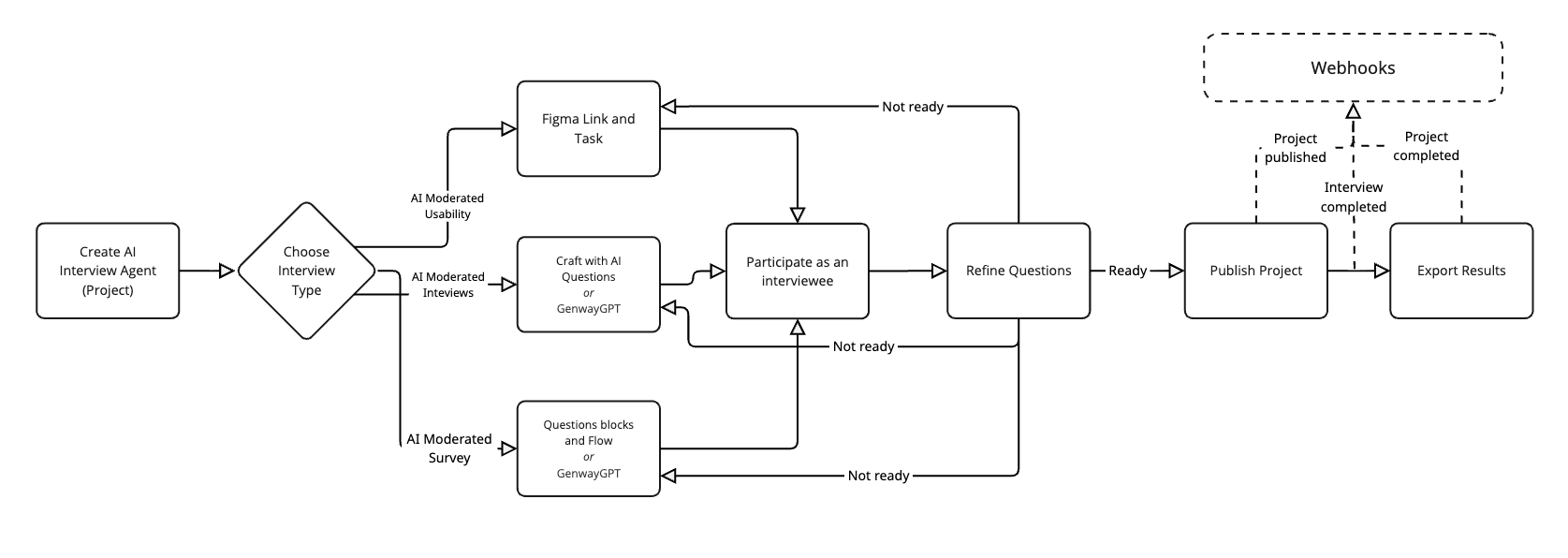
Genway API uses dual-header authentication for all requests to ensure secure access and proper tenant isolation.
Required Headers:
X-Api-Key: YOUR_API_KEY
X-Tenant-Id: YOUR_TENANT_UUID
Both headers are mandatory for every API call. Missing either header will result in authentication failure.
We strongly aim for backward compatibility for the documented endpoints. If backwards-incompatible changes are made, we will aim to release a new version.
- URLs’ entry point is
https://api.genway.ai/. - URLs are versioned
https://api.genway.ai/v1/{endpoint}, e.g.https://api.genway.ai/v1/projects.
The Genway API enforces per-IP rate limits to keep the platform responsive:
| Scope | Limit | Endpoints / Examples |
|---|---|---|
| Global throughput | Up to 50 requests per minute per IP | Applies to every endpoint, including Export interview video and Activate project. |
| Project creation | 10 requests per minute per IP | Create a new project (POST /projects). |
When a limit is exceeded the API responds with 429 Too Many Requests, includes a Retry-After header indicating when you can resume sending requests, and returns the rate-limit payload documented in the 429 response example for endpoints such as Create a new project.
You can subscribe to our status page.
If you require help you can contact our support team at support@genway.ai.
Download OpenAPI description
Languages
Servers
Production environment
https://api.genway.ai/v1
Request
Retrieve a list of all interviews. Supports filtering by project and external metadata.
External Metadata Filtering: You can filter interviews using any external metadata field by using the pattern external_metadata[<key>]=<value>. The <key> can be any string, and the <value> can be any value that was stored as external metadata.
When multiple values are provided for the same external metadata field (e.g., external_metadata[field1]=abc&external_metadata[field1]=def), they are treated with OR logic, meaning the field should match any of the provided values.
Examples:
GET /interviews?project_id=12345678-1234-1234-1234-123456789012- Get all interviews for a specific projectGET /interviews?external_metadata[someExternalId]=1234- Filter by external IDGET /interviews?external_metadata[field1]=abc&external_metadata[field1]=def- Filter where field1 is either "abc" OR "def"GET /interviews?project_id=12345678-1234-1234-1234-123456789012&external_metadata[someExternalId]=1234&external_metadata[user_uuid]=abcd- Filter by user ID, external ID, and project ID (AND logic applied between different fields)
Security
api_key and tenant_id
Query
Filter interviews by project ID
Example: project_id=12345678-1234-1234-1234-123456789012
Dynamic Parameter Pattern - This is not a literal parameter name but represents the pattern for filtering by external metadata.
Replace <external_param> with any external metadata key you want to filter by. You can use multiple of these parameters in a single request.
Pattern: external_metadata[<key>]=<value>
Examples:
external_metadata[someExternalId]=1234external_metadata[userId]=abc123external_metadata[source]=webexternal_metadata[priority]=high
Example: external_metadata[<external_param>]=1234
- Production environmenthttps://api.genway.ai/v1/interviews
- curl
- JavaScript
- Node.js
- Python
- Java
- C#
- PHP
- Go
- Ruby
- R
- Payload
curl -i -X GET \
  'https://api.genway.ai/v1/interviews?project_id=12345678-1234-1234-1234-123456789012&external_metadata%5B%3Cexternal_param%3E%5D=1234' \
  -H 'X-Api-Key: YOUR_API_KEY_HERE' \
-H 'X-Tenant-Id: YOUR_API_KEY_HERE'Response
application/json
{
  "data": [
    { … },
    { … },
    { … }
  ]
}
- Production environmenthttps://api.genway.ai/v1/interviews/{interview_id}/audio-export
- curl
- JavaScript
- Node.js
- Python
- Java
- C#
- PHP
- Go
- Ruby
- R
- Payload
curl -i -X GET \
  'https://api.genway.ai/v1/interviews/{interview_id}/audio-export' \
  -H 'X-Api-Key: YOUR_API_KEY_HERE' \
-H 'X-Tenant-Id: YOUR_API_KEY_HERE'- Production environmenthttps://api.genway.ai/v1/interviews/{interview_id}/video-export
- curl
- JavaScript
- Node.js
- Python
- Java
- C#
- PHP
- Go
- Ruby
- R
- Payload
curl -i -X GET \
  'https://api.genway.ai/v1/interviews/{interview_id}/video-export' \
  -H 'X-Api-Key: YOUR_API_KEY_HERE' \
-H 'X-Tenant-Id: YOUR_API_KEY_HERE'- Production environmenthttps://api.genway.ai/v1/interviews/{interview_id}/flag
- curl
- JavaScript
- Node.js
- Python
- Java
- C#
- PHP
- Go
- Ruby
- R
- Payload
curl -i -X POST \
  'https://api.genway.ai/v1/interviews/{interview_id}/flag' \
  -H 'Content-Type: application/json' \
  -H 'X-Api-Key: YOUR_API_KEY_HERE' \
  -H 'X-Tenant-Id: YOUR_API_KEY_HERE' \
  -d '{
    "reason": "suspicious_behavior_detected"
}'Response
application/json
{
  "status": "flagged"
}
Webhooks
Webhooks deliver event data to your applications as it happens, offering an alternative to frequent data polling.
- The
secretcreated via the/webhooks/secretsendpoint is permanent and should be stored securely in your system. This secret will serve for the verifying section. - The
x-hook-secretis temporary and should be used only once during the confirmation process. - Until the webhook is confirmed, no events will be sent to the subscriber's endpoint.
Operations
Errors
The Genway API uses standard HTTP response codes to indicate the success or failure of the request. Codes follow this pattern:
- 2xx codes indicate success.
- 4xx codes indicate a request that failed given the information provided (e.g., a required parameter was omitted).
- 5xx codes indicate an error with Genway's platform.